
STANDARDPROJECTS
All work Contact
Web app · Media

Official live news channels,
and free films, in one place.

LiveTV is a viewing page for official live news channels from Germany, the United States and beyond, plus free films that are Creative Commons or public domain. It shows only what the owners have chosen to share, and never copies or re-streams anything.

Official streams 17 channels 7 free films Creative Commons
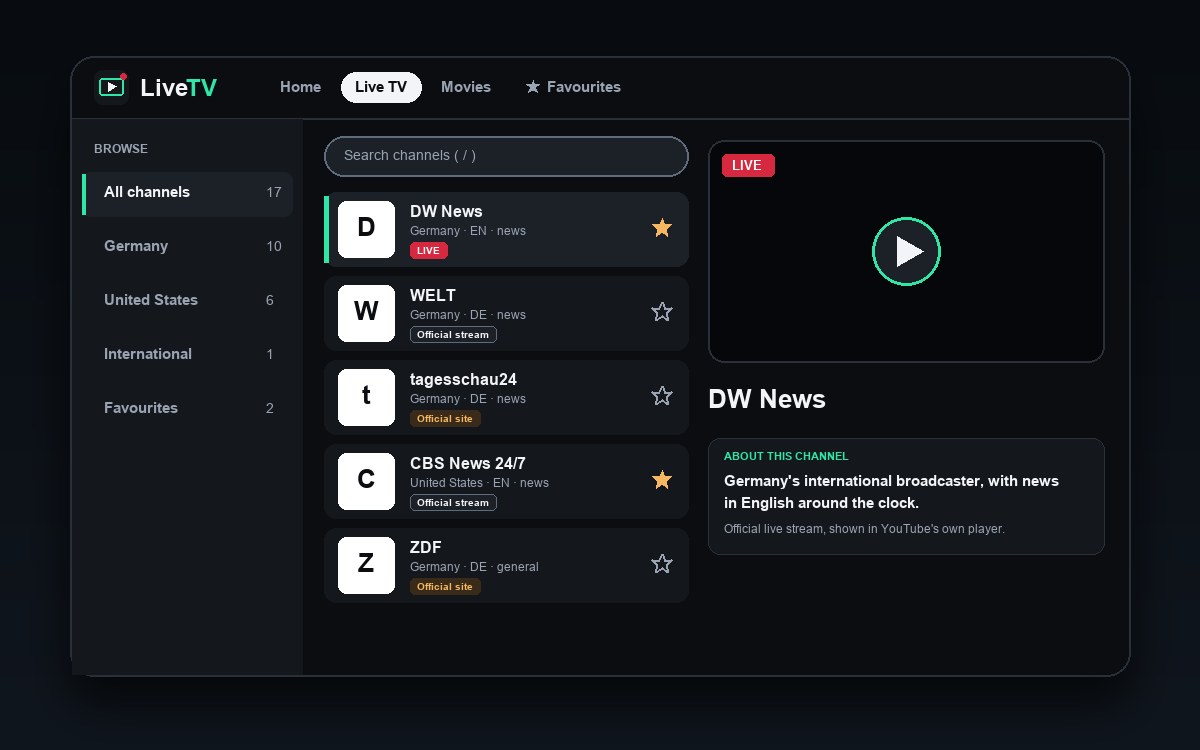
Illustration of the LiveTV live view: a browse list, channel cards and a player with an about panel
01 / What it does

Live news and free films, without hunting for links.

Every channel and film is in one place, and everything comes from a source its owner allows.

01

Channels and filters

  • 17 channels from Germany, the United States and international
  • Five views: all channels, Germany, United States, International and favourites
  • Germany: DW News, WELT, tagesschau24, Das Erste, ARD alpha, ZDF, ZDFinfo, phoenix, 3sat and ARTE (Deutsch)
  • United States: CBS News 24/7, ABC News Live, NBC News NOW, LiveNOW from FOX, Bloomberg Television and FOX Weather. International: Al Jazeera English
02

Official streams only

  • 8 channels play inside LiveTV, in YouTube's embedded player, from the broadcaster's own official channel, which allows embedding
  • The other 9 channels are shown only on the broadcaster's own website, so LiveTV links to its official page
  • Nothing is copied or re-streamed, and no country limit is worked around
03

Player and channel information

  • Pick a channel and it plays on the same page, with a fullscreen button
  • An “About this channel” panel says what the channel is, with a button to the official site
  • Channels shown only on a broadcaster's site get a card with a button that opens that page in a new tab
04

Find and keep channels

  • Search by channel name, category or description (press /)
  • Star channels as favourites and filter to just those
  • Up and down arrows change channel, F goes fullscreen
  • Remembers your last channel and filter
05

Free films

  • 7 films: six short films from the Blender Foundation (Creative Commons) and Sita Sings the Blues (CC0)
  • A featured film, rows to browse and search
  • A licence, a credit and a way to report a rights concern on every film page
  • Films play in the Internet Archive's own player
06

Rights and takedown

  • A page that explains where everything comes from and which licence applies
  • Rights holders can ask for a channel or film to be removed, and it comes down promptly
  • No ads and no payments
02 / Interface and interaction

How the LiveTV page looks and behaves.

A three-part layout people already know from TV apps: choose where, choose a channel, then watch with the channel information beside it. Everything works with a mouse, a finger and a keyboard.

  • 1Browse. All channels, Germany, United States, International and favourites, with counts. The last choice is remembered.
  • 2Search. Matches name, category or description. Press / to jump here.
  • 3Channel cards. Name, country, language and category. The star saves a favourite. The channel you are watching has a green edge and a LIVE badge.
  • 4Channels that open the official site. The “Official site” badge means the broadcaster shows this channel only on its own website, so a button takes you there.
  • 5Player. YouTube's embedded player, from the broadcaster's official channel. If it does not start, press play or open the official site.
  • 6Controls. Fullscreen, and a button to the broadcaster's official site.
  • 7About this channel. Says what the channel is and where it is shown, so the source is always clear.

How it responds

When youWhat happens
Open the pageThe home page shows large tiles to Live TV, Movies and Favourites, and a Continue watching card. In Live TV, your last channel, filter and favourites come back.
Tap or click a channelAn embeddable channel plays in place. A channel shown only on the broadcaster's site gets a card with a button that opens its official page in a new tab.
↑↓Changes channel through the list you are looking at.
FEnters or leaves fullscreen.
/Moves the cursor to search.
Open MoviesYou see a featured film and rows of films, with search. Every film shows its licence, its credit and a link to report a rights concern.
Press a starSaves or removes a favourite, remembered in your browser.
Type in searchThe list narrows instantly by name, category and description.

What you see in the player

Playing in placeYouTube's player shows the official live channel, with a LIVE badge on the card.
Opens on the broadcaster's siteA card says where the channel is shown, with a button that opens in a new tab.
Does not startPress play in the player, or open the official site from the button under it.
A film in the Internet Archive's playerWith its licence, credit and a link to the source page beside it.
No favourites yetTells you to tap a star on a channel and shows them here.
No matchSays no channel matches your search.

Design direction

LiveTV follows patterns people know from streaming and TV apps: a dark canvas, one featured item, rows of rounded cards and a focus state you can always see. These are the screens in the app today, and the full kit, with colours, type, components and screen patterns, is linked below.

Home hub

Large tiles to the main areas: live TV, movies, favourites.

Three-column live view

Browse, channels, and the player with channel information.

Hero and rails

One featured film, then rows of cards you move across.

03 / How it works

Three steps.

Open the page

Open the link in a browser. There is nothing to install.

Choose where

Show all channels, only Germany, only the United States, or International.

Pick a channel

Tap a channel. An embeddable one plays in the player, and the others give you a button to the official site.

Only sources the owner allows

The channels that play in LiveTV are official live streams that the broadcaster publishes on YouTube and allows to be embedded. The others link to the broadcaster's own site. Every film carries a Creative Commons licence or was released into the public domain by its creator. LiveTV does not own the programmes, and a channel can stop or change at any time.

You can report a concern

Films play in the Internet Archive's own player and are hosted by the Internet Archive, not by LiveTV. Every film page has a link to report a rights concern, and there is a rights and takedown page. If you own the rights, we remove the content promptly.

04 / Try it

Open LiveTV now.

Want a page like this for your own channel, videos or business? Tell us what you need.